Background
About Scaler
Scaler is a technology education platform that helps working professionals build industry-relevant skills through structured programs, mentorship and career support.
What is n8n?
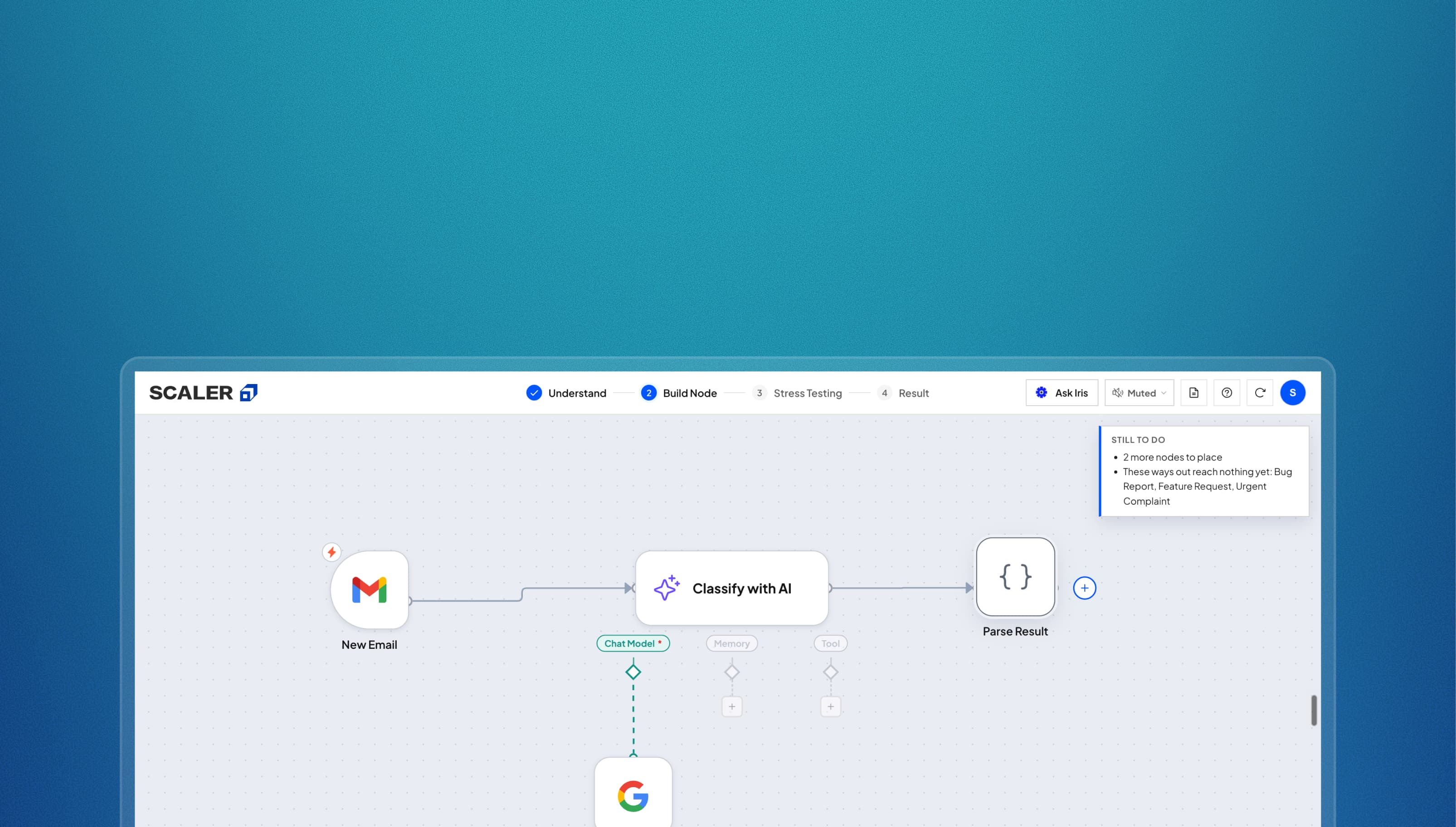
n8n is a workflow automation tool. You connect blocks called nodes on a canvas. Each node does one task. It can read an email, ask an AI model to classify it or send data to another app.
My role
I worked as a Design Engineer and owned the concept, product design and engineering. The full project took two weeks. I shipped the production build in one week.



Outcomes
4.55 / 5
Average rating across 578 rated attempts
90%
Of those 578 gave four or five stars
73.2%
Of learners who started an attempt finished it
The problem statement
Scaler teaches n8n in its AIML and DSML courses. Learners use it to build automations for real clients. Classes run online. After the theory, learners join a one-hour practice session. The instructor shares their screen and solves one n8n problem step by step.

Learners
Using n8n for the first time in a live class.

Instructors
Teaching and supporting a full cohort at once.
Where the class struggled
Learners watched the shared screen and repeated each action. This produced a finished workflow. It did not show whether they understood each step. I spoke with about ten learners and instructors. I also observed an evening class. I noted where both groups needed help.
Learner notes
Learner theme
Learners copied the instructor's steps, so Scaler could not tell whether they understood the problem.
Learner theme
n8n sat outside Scaler, so learners had to return to the class chat for help.
Learner theme
Learners could not continue until the instructor answered.
Instructor notes
Instructor theme
Instructors could not help every learner during one live session.
Instructor theme
A completed workflow did not show how well each learner understood the problem.
Instructor theme
Scaler could not track or grade work done in n8n.
These notes are themes I synthesized from those conversations and the class I observed. They are not verbatim quotes.
Instructors' key concern was that
they couldn't grade learners' understanding of n8n.
The team explored hosting n8n inside Scaler's assessment platform so learner work could be tracked and graded. The reported estimate made that option too expensive.
₹70,000Estimated per month
Hosting n8n
₹5,000Estimated per month
In-house n8n Judge
So, I was tasked with building n8n Judge in-house
Because the hosted option was expensive, stakeholders wanted to test an AI-led alternative. I was asked to design and build that experiment. It had to help learners understand and build a workflow, and show instructors how well each learner understood it.
How I started off with this build
I observed a live class
I watched how the instructor taught and how learners followed. I noted when learners asked for help.
I used n8n as a beginner
I completed a workflow and watched beginner tutorials. The blank canvas offered many choices but no clear starting point.
Two constraints I needed to keep in mind
01
AI could not calculate the score
AI is not deterministic, so it can produce different answers for the same input. I needed a fixed rubric to score every workflow consistently.
02
New problems had to be easy to add
I needed an authoring pipeline that let the team add a problem, its workflow, sample cases and scoring rubric without rebuilding the platform.
My idea for handholding and grading was to mimic my own design process
Designers break down a problem first, then design the solution, then design for the edge cases. I gave the Judge the same mental model so it could guide a learner and measure understanding in the same pass.
Understand
Break down the problem and identify the workflow.
Build
Add and configure one node at a time.
Stress test
Design for cases outside the normal path.
Result
Review the score, mistakes and next steps.
Fun fact: no Figma was used in my design process :D
For this project, I went with:

Next.js
Built the learner and instructor experiences.

Railway
Hosted the production application.

ElevenLabs
Generated the trained instructor voice.

AWS S3
Stored the generated voice clips.

Claude
Generated feedback and powered Ask Iris.

Cursor & Claude Skills
Ran the authoring pipeline for new problems.
Presenting to you, n8n Judge
Design decisions breakdown
1. Understand Phase: Breaking down the problem statement
Just like in the design process, I wanted learners to understand the problem before solving it. A learner can assemble a correct workflow without ever understanding its shape.
So the first phase is Understand: a short quiz about the workflow and its nodes that primes them before they reach the canvas.
Why this stage exists
- The instructor team wanted better outcomes from the n8n class: learners comfortable enough to build setups on their own. Understanding the problem is where that starts.
- Iris explains every answer, right or wrong, so the stage teaches while it grades.
2. Build Phase: Handholding learners at each step inside our n8n simulator
n8n Judge handholds learners through the build by simulating the n8n experience. When I tried n8n myself, the blank canvas gave me every option and no starting point, so the Judge walks learners through it one node at a time. Clicking the plus opens the same drawer n8n opens, and placing the right node moves them into its setup.
A real n8n workflow compared with the simulator.
How the handholding works
1–2 of 3
3. Introduced voice to the Judge to bring it closer to an actual class experience
I gave Iris, our AI mascot and mentor, a trained voice based on the lead instructor, Shivank Agrawal. This made the guidance feel closer to the live class.
“Hey there! I’m Iris, your mentor. I’ll be guiding you through this whole n8n simulation. Ready when you are?”
Why voice, not just text
- In the live class an instructor talks learners through each step. Voice was the closest I could get to that inside a product.
- Iris still asks rather than tells out loud, so hearing the mascot does not shortcut the thinking.
4. Run Step: Helping learners visualise how an n8n node setup actually works
As part of learning how n8n works, I introduced Run mode. The node setup runs through several test cases for the given problem, which helps learners visualise how their setup actually behaves.
This stage is not graded
It exists purely for visualisation, so learners can see how n8n works. It also acts as a delight factor in the Judge.
5. Stress Testing: Challenging a learner's understanding of the node setup
An n8n node setup can pass its test cases and still fail at a few edge cases. So this phase asks two “what if” questions to test the learner's understanding of the entire setup.
Why the attempt ends here
- These questions test whether a learner understood the problem and the setup, not whether they reproduced the class demo.
- These are graded as well, and appear as part of the final report.
6. Result: Showing learners how they performed and where to improve
I developed a rubric system that calculates a deterministic score, while Claude provides pointers for the learner to improve, based on the interactions recorded during the attempt.
The server calculates the score
The server scores each attempt against the rubric, which keeps the score deterministic.
Claude explains the result
Claude turns the result into clear strengths, gaps and next steps. It cannot change the score.
7. I also instrumented the product, for analytics and to find out where it can be improved
The admin panel was built for the Judge. It captures the ratings and feedback learners leave, and it also holds interaction traces. Those traces tell me where learners are dropping off, and I can take those insights into user research calls.
What the admin panel gives me
1–2 of 4
8. Learners can take the workflow they built into real n8n
The simulator is a bridge into n8n, not a replacement for it. Once a learner clears the score threshold, the report offers the workflow as a real n8n JSON file. They import it into n8n, add their own credentials, and carry on building in the actual tool with the node setup they just made.
Why this matters
- The class existed to get learners building in n8n. An exercise that ends inside a simulator teaches the model but leaves them at the same blank canvas afterwards.
- It gives the attempt something to show for it. The learner walks away with a working file, not only a score.
Iterations and variations
The first build was a bare canvas with a node palette. It worked, and it taught nothing.
Every version after that went to the instructor team. Their feedback added the handholding, pushed the editor closer to real n8n, and shaped the rubric behind the score. Two days of stress testing closed it out.
Outcomes and metrics
809
Attempts completed across six problems
340
Learners behind those attempts
578
Of those attempts left a star rating
367
Of those attempts left a written comment
Straight from the rating box
nice experience with iris dropping in for each input and correcting the mistakes
This is some serious AI mentor. I felt really engaging and building felt like playing a game. KUDOS
comprehensive guidance on the case study and voice over introduction to the problem helped in understanding the problem clearly.
Interactive, New way to improve learning experience and Gain valuable insights
It was the thing missing in the course and we need it badly
really engaging, builds confidence, but too much hints given, which makes it very easy to solve
The walkthrough was smooth. Easy to understand and implement.
Very interactive and close to real life scenarios
What I changed after talking to learners
After release I called learners who had already used the Judge. I pulled each one from the admin panel first, so I could see where their attempt stopped before I asked them anything.
The calls gave me four problems to fix. What the learner said is on the left. What I did about it is on the right.
What a learner said
Iris said “If you are stuck, let me know. I can help you.” So I clicked the “Ask Iris” button. But it did not reply.
What I changed
Fixed Ask Iris
The API key was broken, so Iris could not answer. I fixed the key. I also changed the model provider from Anthropic to OpenRouter. OpenRouter switches to another model on its own when one model is down.
What a learner said
Iris is communicating to me in voice, but when I responded, it did not respond back.
What I changed
Rewrote Iris's voice copy
Iris used to say “If you have any questions, please tell me.” A learner heard that and spoke back to her. So I changed the line to “If you have any questions, ask them through the Ask Iris button.” It is a small change, and it removed the confusion.
What a learner said
There is no retry button at the end. Can you please fix this?
What I changed
Added retry and next
I added a retry button to the result page. I also added a next button, so a learner can move straight to the next problem.
What a learner said
Once I started the problem there was no way back. I could not get to the other problems. Please fix this.
What I changed
Made the logo a way out
A learner can now click the Scaler logo on any screen to go back to the home page.
Reflections and key takeaways
- I wore three hats on this one: designer, engineer and product owner. Holding all three meant a decision could be taken, built and tried the same day.
- Instrumentation is what made the research possible. The traces told me which learners to call after release, and what to ask once I had them on the phone.
- I started from the problem rather than the tool, from what a learner has to understand before they can build. The four stages came out of that, and the rubric followed.